
Hidden Gem: Device Sync with Microsoft Entra Cloud Sync (Preview)

Because of today's discovery, which is only a few hours old, I had to revive my blog: Microsoft's latest hybrid identity newborn is called Device Sync. The important detail: Device Sync with Cloud Sync.
If you have worked with hybrid identities, you probably know this sentence:
“Cloud Sync looks nice, but we still need Entra Connect Sync because of devices.”
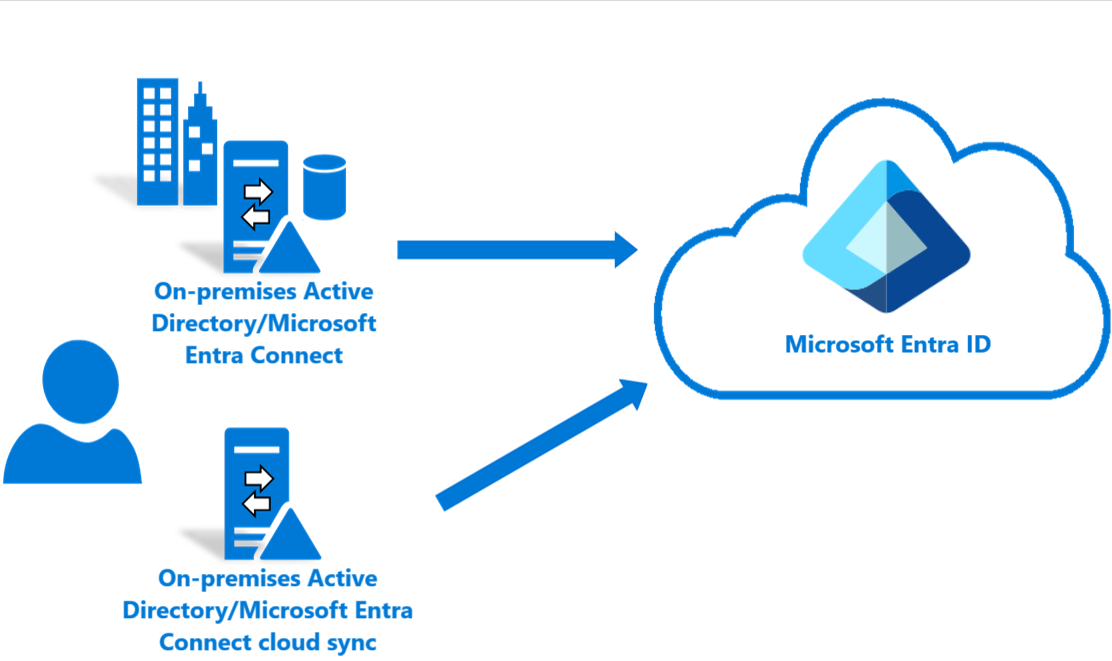
For a long time, that was a very practical blocker. Microsoft Entra Cloud Sync was the lightweight, cloud-managed sync engine for users, groups, and contacts, while Microsoft Entra Connect Sync remained the classic choice when device synchronization or Microsoft Entra hybrid join was part of the design.
Today, however, there is something new: Device Sync for Microsoft Entra Cloud Sync — currently in Preview. The new Microsoft Learn page is titled "Configure device sync with Microsoft Entra Cloud Sync (preview)" and is described as a guide to synchronize Active Directory computer objects to Microsoft Entra ID.
Long story short: this might be one of the most important enabling and strategic features for hybrid identity this year.
Not because it makes hybrid join magically modern. It does not.
Not because it removes every reason to run Entra Connect Sync. It does not.
But because it attacks one of the most common architectural dependencies that kept customers tied to the old sync engine.
Microsoft describes Cloud Sync as the strategic direction for hybrid identity synchronization, especially for scenarios where organizations want less on-premises infrastructure, multiple active agents, and better support for disconnected forests.
Until now, the big “but(t)” was device support. (...and I cannot lie 🎶)
The Microsoft migration decision guide still shows the historical picture very clearly: Device Synchronization was supported by Microsoft Entra Connect Sync and not supported by Cloud Sync at the time the guide was published, while other Connect-specific capabilities such as advanced sync rules, full attribute-based filtering, large-scale limits, reconciliation, and some cross-forest references remained reasons to keep Connect Sync.
The new Device Sync preview changes that discussion. At minimum, Microsoft has now started moving AD computer object synchronization into the Cloud Sync world. So this is more than a small checkbox:

At the time of writing, the shown feature is still in Preview. While the direction is promising, it is too early to declare Microsoft Entra Connect Sync obsolete. Organizations should carefully evaluate which Connect Sync features they still depend on before considering any migration.
fact
Let's be honest: Nobody likes hybrid joins and its approach, but it's there and it needs a device identity in Microsoft Entra ID. In the traditional flow, domain-joined Windows devices rely on Microsoft Entra Connect Sync to synchronize the computer object — including the relevant device attributes — from Active Directory to Microsoft Entra ID.
With Connect Sync, the server is a major identity component and is commonly treated as a Tier 0 / Control Plane Asset . With Cloud Sync, the agent is still important and still requires privileged access within AD DS, but it is not the place where the whole synchronization brain lives. Microsoft’s decision guide calls out cloud-managed configuration, multiple active agents, automatic failover, and reduced on-premises management as key technical benefits of moving toward Cloud Sync. In my opinion it is also about reducing the dependency on yet another Tier 0 server in the environment. From a security perspective, what caught my attention is the possibility of reducing dependency on a traditional Entra Connect Sync machine- one of the most sensitive identity-related servers in many hybrid environments.
For device synchronization, the architectural impact is therefore not only “another object type is supported.” The bigger point is:
Device-object synchronization may become part of the same cloud-managed and lower-maintenance synchronization model that many organizations already want for users and groups.
Why this matters
There are a few practical reasons why this preview is worth watching closely:
1. Infrastructure simplification
If a customer only kept Microsoft Entra Connect Sync because of computer objects, Cloud Sync Device Sync could become the missing migration piece. Again...that does not mean you remove Connect Sync tomorrow. But it does mean you can start asking a better question:
“Which exact Connect Sync features do we still use?”
If the answer is mostly “device sync,” the roadmap just changed.
2. Better fit for distributed environments
Cloud Sync natively supports scenarios like multiple forests, disconnected forests, and piloting Cloud Sync alongside Connect Sync, as long as objects are scoped correctly and not synchronized by both tools at the same time.
This is especially interesting in Merge & Acquisition (M&A) scenarios. Community discussions before this preview often described Cloud Sync as great for disconnected identity forests but blocked for endpoint integration because it did not synchronize "legacy" device objects.
3. Less sync-server gravity
Microsoft’s Cloud Sync decision guide states that new identity and synchronization features are being developed primarily on the Cloud Sync platform, making it the recommended path forward for most organizations. Also the already mentioned part about reducing legacy attack surface and improve security by using cloud features are are strong benefits on their own. Of course any reader here should should be familiar with the Shared responsibility model.
So I think this one gets more important in future: Migrate from Microsoft Entra Connect to Cloud Sync: Decision Guide. And of course outline the limitations and comparison between Microsoft Entra Connect and Cloud Sync.
final thoughts
The architectural opportunity is clear:
reduce dedicated sync server footprint,
simplify hybrid designs like Azure Virtual Desktop (AVD),
improve M&A identity integration,
move more customers toward the agent-based Cloud Sync platform,
and reserve Connect Sync for the scenarios where it is genuinely still required.
Hopefully this newborn learns to walk quickly - or in other words: please get out of preview fast.
Comments
Join the discussionNo comments yet. Be the first to comment.