
14 Years of Microsoft Learn
and what my transcript told me about myself
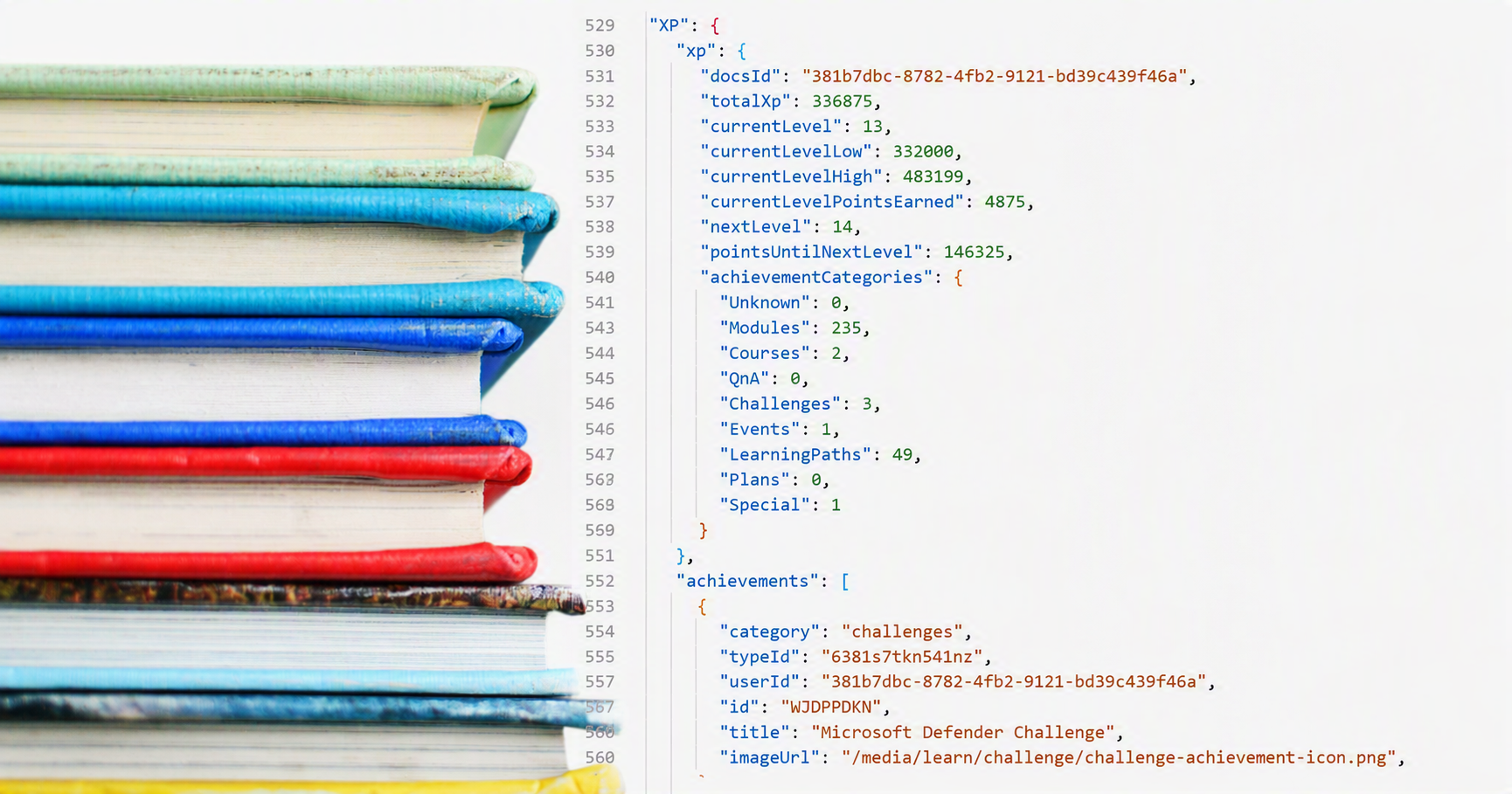
You know how it goes: you export your own Microsoft Learn data as JSON "just for fun" because you're curious how many badges you've collected over the years. Two hours later you're sitting there with PowerShell parsing a 26000 line data set of your learning characteristics.
That's exactly what happened to me. Instead of calling it a day, I got data analysis. Instead of a Netflix episode, I got ConvertFrom-Json. Here's what 2,071 completed learning items, 336,875 XP, and 14 years of certification-collecting madness say about me.
What is this thing anyway?
Microsoft Learn stores pretty much every interaction you've ever had with training, modules, learning paths, and certifications. And you can download this entire dataset as JSON.
So I pulled the important blocks out with PowerShell: Progress.completedLearningItems (every single completed learning item, including timestamps), XP.achievements (badges & trophies), Certifications.wwlCertifications (everything I've ever passed), and TechProfile (my profile itself).
The raw numbers, before it gets funny
| Metric | Value |
|---|---|
| Current XP level | 13 (336,875 XP) |
| Total completed learning items | 2,071 |
| ...of which modules | 227 |
| ...of which individual units | 1,844 |
| Module badges | 235 |
| Learning path trophies | 49 |
| Active/historical certifications | 40 (28 currently listed as active) |
| First certification | June 2012 |
| Latest certification | July 2026 |
Quick math: almost 14 years of uninterrupted Microsoft exam history. That's longer than some marriages, and definitely longer than any single certification actually reflects "current knowledge" - but more on that later.
When did I actually do all this learning?
Let's start with the yearly overview. And this is already interesting:
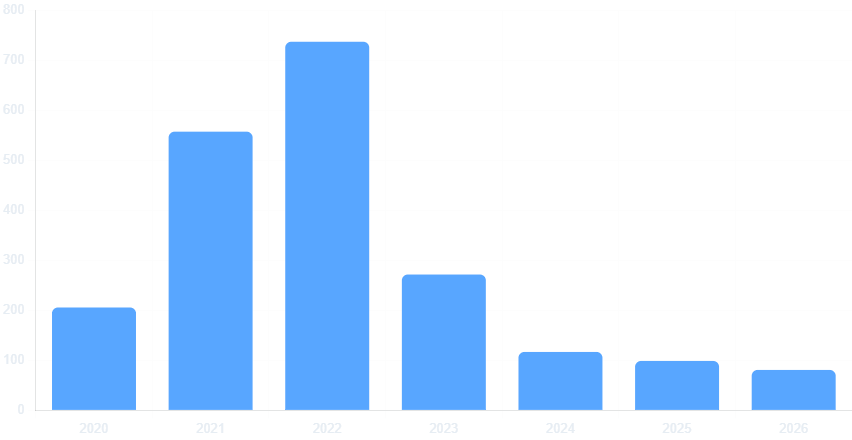
Looks like 2022 was apparently my personal "I'm-really-going-to-learn-everything" year, with 738 completed items. Then a steep drop toward 2024-2026. But no, I didn't stop learning.
And then there's my absolute record day: September 23, 2020, with a whopping 206 completed items in a single day. Before you think I spent half my life clicking through learning paths in one day: that was exactly the day Microsoft migrated my old MCP transcript into the new Microsoft Learn profile. My "most productive day of all time" was actually a backend migration job at Microsoft. I'll take the win anyway.
What time of day am I capable of learning?
Here's the statistic my friends and family have long suspected:
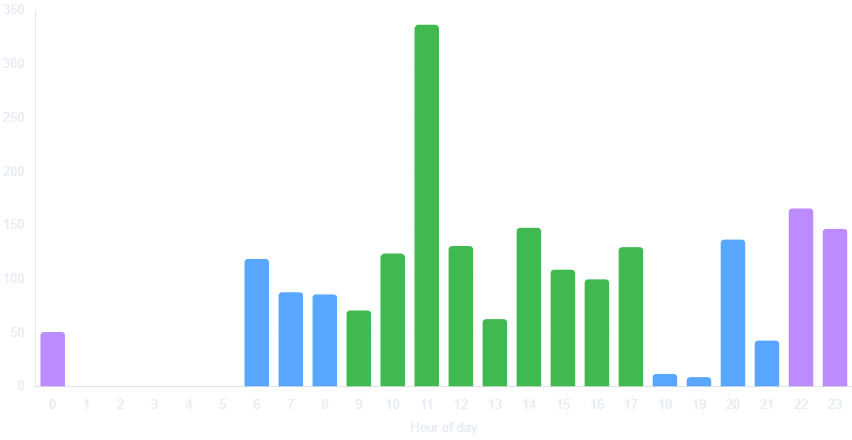
My absolute peak is at 11 AM - right before lunch, exactly when concentration should be dropping, but apparently the "I-need-to-finish-this-before-my-break" reflex kicks in instead. The second wave shows up between 10 PM and 11 PM (marked in purple) - classic night-owl behavior, with 17.6% of my total learning activity happening between 10 PM and 6 AM.
Between 6 PM and 7 PM, though: dead silence. That's clearly the sacred family time slot, which even I won't sacrifice for an Azure module.
Weekday check: weekends are for family and friends
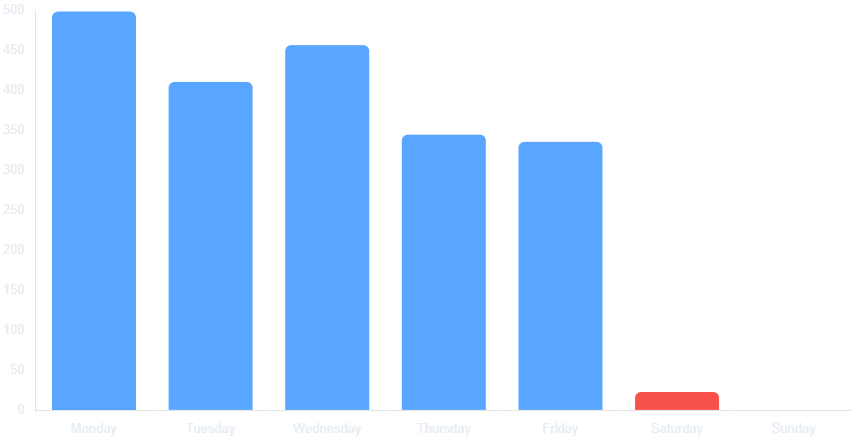
Out of 2,071 learning items, only 23 (1.1%) happened on a Saturday - and exactly zero on a Sunday. At first glance, that looks like an admirable work-life balance. 🤪
Monday, by the way, is my busiest day - starting the week motivated, then noticeably tapering off toward Friday. Shocking, I know.
What I'm apparently obsessed with
I searched the titles of all 2,071 learning items for keywords. Result: a pretty honest psychological profile of not only my interests over the past few years.
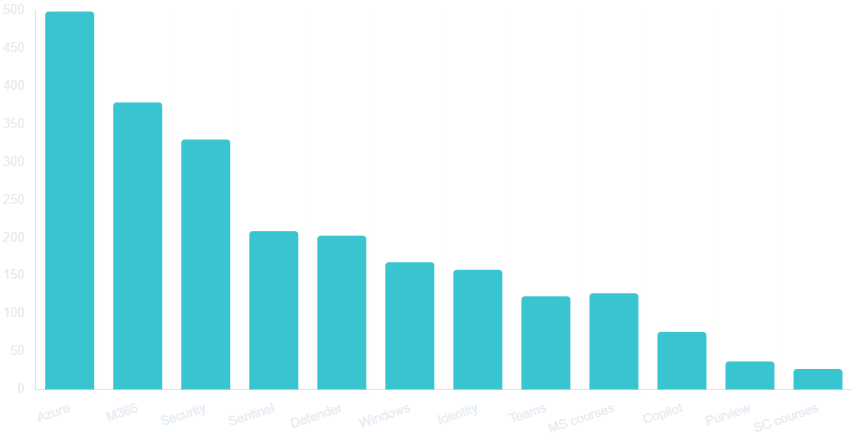
My certification history is also a small Microsoft timeline in disguise. I started with Windows Server, Active Directory, and Exchange (2012-2016), moved into Azure and Microsoft 365 (2017-2020), then became increasingly focused on security, identity, and compliance (2021-2024), followed by some AI:
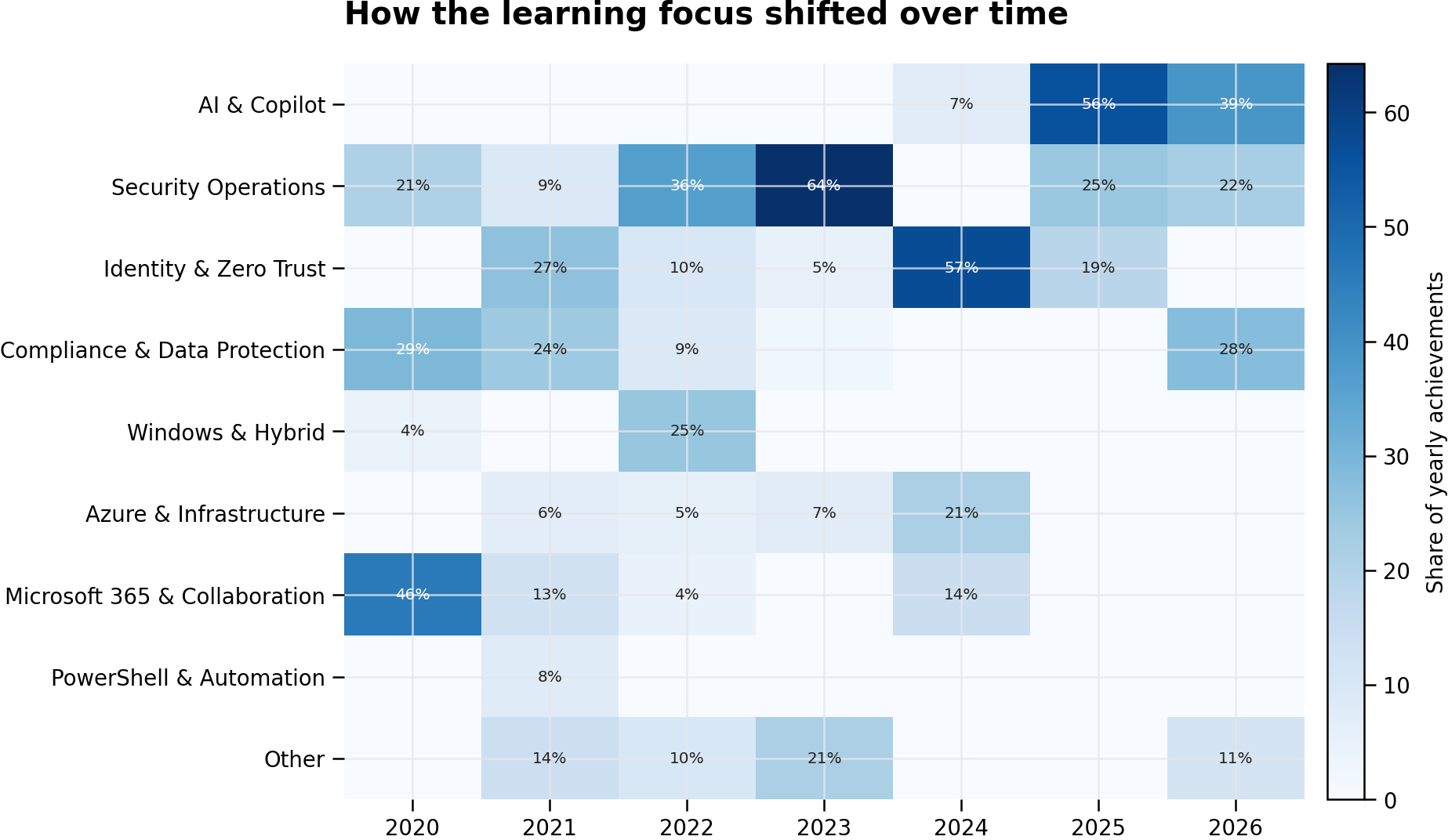
And yes, Copilot has been climbing steadily - 76 hits, and clearly trending upward, since AI now shows up in seemingly every second new learning path and certification.
14 years of certification-collecting madness
Now it gets historical. My certification history goes all the way back to 2012 - Windows Server 2008, MCITP, MCSA, the full retro collection:
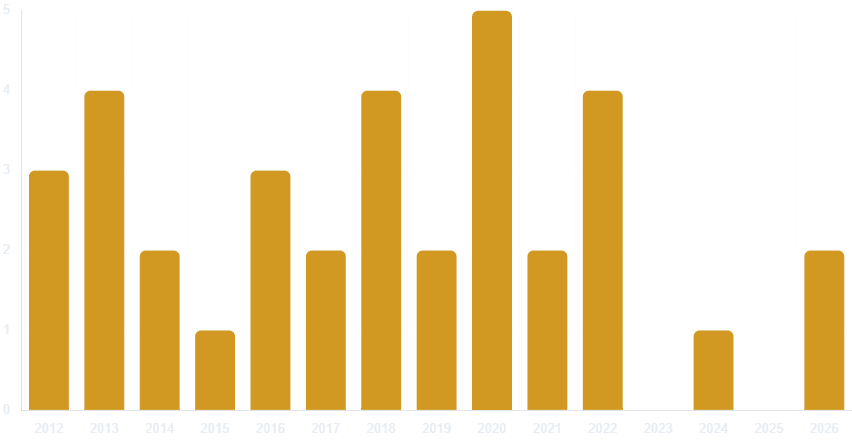
2020 was my personal record year with five certifications passed - and yes, that was also the year everyone was doing something at home thanks to COVID. No judgment on whose pandemic hobby was healthier.
2023 and 2025 are completely missing from the chart. Not because I paused, but maybe because some years are dedicated more to the "renewal" and "re-certification" bureaucracy than to brand-new exams. That's also part of the Microsoft fan boy life. Btw - the Azure Administrator certification has been with me since 2018 and is therefore the reigning renewal champion.
The fail stats nobody should really see
A look into moduleAssessments reveals something refreshingly human: out of 19 documented module quizzes, it took 33 attempts total - only 10 of those passed on the very first try. That's basically failing every second quiz at least once, followed by a comeback on the second or third attempt.
Possibly most important takeaway: not even 336,875 XP and 40 certifications protect you from failing a 3-question module quiz on your first attempt. Growth mindset, live and proven, straight from my own training data.
But at least I've only failed twice in proctored exams:
SC-300 (Identity and Access Administrator): failed on March 5, 2021 - and passed on December 23, 2022. That's a 21-month redemption arc.
Exam 342 (Advanced Solutions of Microsoft Exchange Server 2013): failed on December 5, 2014 - and passed three days later on December 8, 2014. Just a quick re-read of the failed topics and a rematch.
Luckily Microsoft Learn doesn't judge how long the comeback took.
Applied skills deep dive
Buried in SkillAssessment.labSessionScoreReports data are not only useful score sets, but also a few humbling contrasts:
| Skill | Score | Passed |
|---|---|---|
| Administer Active Directory Domain Services | 24/24 (100%) | ✅ |
| Get Started with Identities & Access (Microsoft Entra) | 15/15 (100%) | ✅ |
| Implement Information Protection & DLP (Purview) | 23/23 (100%) | ✅ |
| Implement Retention/eDiscovery (Purview) | 23/23 (100%) | ✅ |
| Defend Against Threats (Defender XDR) | 19/20 (95%) | ✅ |
| Create Agents in Copilot Studio | 3/23 (13%) | ❌ |
But if there is a lesson worth highlighting , it is this: the applied-skills evaluation exposes the measurements in detail. There are fields such as activityGroupResults and scriptResult that show exactly how each task was evaluated. I have passed all modules like "Configure a Microsoft Defender XDR environment" or "Manage incidents in Microsoft Defender XDR", but in the group "Manage devices by using Microsoft Defender for Endpoint" I have missed the activityName "XDR-02-02" with scriptResult "GatewayWindowsDefenderATPOnboardingPackage.zip not found":
 {
            "id": "925951f8-d33e-492c-93bc-6ae17bad6756",
            "name": "Manage devices by using Microsoft Defender for Endpoint ",
            "scoreValueTotal": 3.0,
            "aggregateScore": 2.0,
            "studyGuideUids": "learn.wwl.deploy-microsoft-defender-for-endpoints-environment,learn.wwl.configure-settings-for-alerts-detections-microsoft-defender-for-endpoint,learn.wwl.configure-manage-automation-microsoft-defender-for-endpoint\r\n",
            "passed": false,
            "activityResults": [
              {
                "activityId": "2a350d5d-bee7-4b7a-af37-f26013d312b5",
                "activityName": "XDR-02-02",
                "scored": true,
                "score": 0.0,
                "passed": false,
                "scriptResult": "Cannot find path 'C:\\Users\\Admin\\Downloads\\GatewayWindowsDefenderATPOnboardingPackage.zip' because it does not exist."
              },
              {
                "activityId": "6374bb26-fd27-4c6c-829c-13f93fa46268",
                "activityName": "XDR-02-03",
                "scored": true,
                "score": 1.0,
                "passed": true,
                "scriptResult": "Create a device group and add a device\r\n--------------------------------------\r\n\r\n\r\n\r\n\r\ncomputerDnsName : client2\r\n\r\nrbacGroupName   : Group1\r\n\r\n\r\n\r\n\r\n\r\n\r\n\r\n\r\n"
              },
              {
                "activityId": "d33139b4-44f6-469b-94c7-5e03065250b8",
                "activityName": "XDR-02-01",
                "scored": true,
                "score": 1.0,
                "passed": true,
                "scriptResult": "Onboard devices in Microsoft Defender for Endpoint\r\n--------------------------------------------------\r\n\r\nDeviceName : client2\r\n\r\nOnboardingStatus : Onboarded\r\n\r\n\r\n"
              }
            ]
Even if learning is failing and vice versa, the lesson is simple: do your homework and prepare yourself. Otherwise, it could go wrong 😉
Nothing says "growth mindset" quite like scoring 13% on the one skill that's supposed to be the easy, no-code future of AI.
Final thoughts
So what did I actually learn from my own learning profile? Honestly, more about myself than I bargained for.
I learn best right before lunch and late at night - neither of which is exactly a scientifically recommended focus window.
Weekends remain (mostly) off-limits - call it discipline or just lack of free time.
My "most productive day ever" was a data migration, not an actual achievement of mine.
Azure, M365, and Security have defined my interests for years - no surprise there, but nice to finally see it poured into charts.
And even after 14 years and a certificate folder that's starting to look like a small bookshelf, I reliably fail three-question quizzes on the first try:
So making failures is learning for sure!
If you feel like dissecting your own learning behavior: the export is available through your Microsoft Learn profile, the analysis takes less than a hour with PowerShell and a bit of AI - and a healthy dose of reality check is guaranteed to come free of charge.
Now live the growth mindset 😉
Comments
Join the discussionNo comments yet. Be the first to comment.